


I hate bots. I hate the reseller culture behind them. And last week, I built one to buy an iPhone Duo.
In my defense, I tried everything else first.
The iPhone Duo sold out within half an hour of preorders opening. I watched my own delivery estimate slide from October to December to January 29, 2027, in a few hours.
I couldn’t wait that long. I’m building apps I want to feel great on the Duo, and I won’t ship Duo support until I’ve held one and tested it myself. No iPhone Duo, no launch.
So I spent a week trying the most common routes: Apple Stores, and Apple’s website every time stores restocked. Every time a phone showed up in-stock, it was gone before I could finish checking out.
Then I wrote a small script to watch Apple’s inventory and buzz my phone the moment one appeared nearby.
One morning, it buzzed under my shoulder.
I was asleep, and it took me a second to understand what I was looking at: an iPhone Duo, available at a store nearby. Within seconds I was at my desk. I’d prepped it all the night before: the model, the store, the exact buttons to press. I went through Apple’s checkout faster than I’ve ever bought anything online.
It still took three or four minutes to reach the last screen.
It was gone - sold out.
That was the moment I understood two things. Knowing where the phone was wasn’t going to be enough. And I was pretty sure the people I was racing weren’t people.
The third time I lost at checkout, I whispered it to myself: Shit, I have to build a bot. That same day, I posted here on Substack that I was going to build one to beat the other bots, even though I’d never built one before.
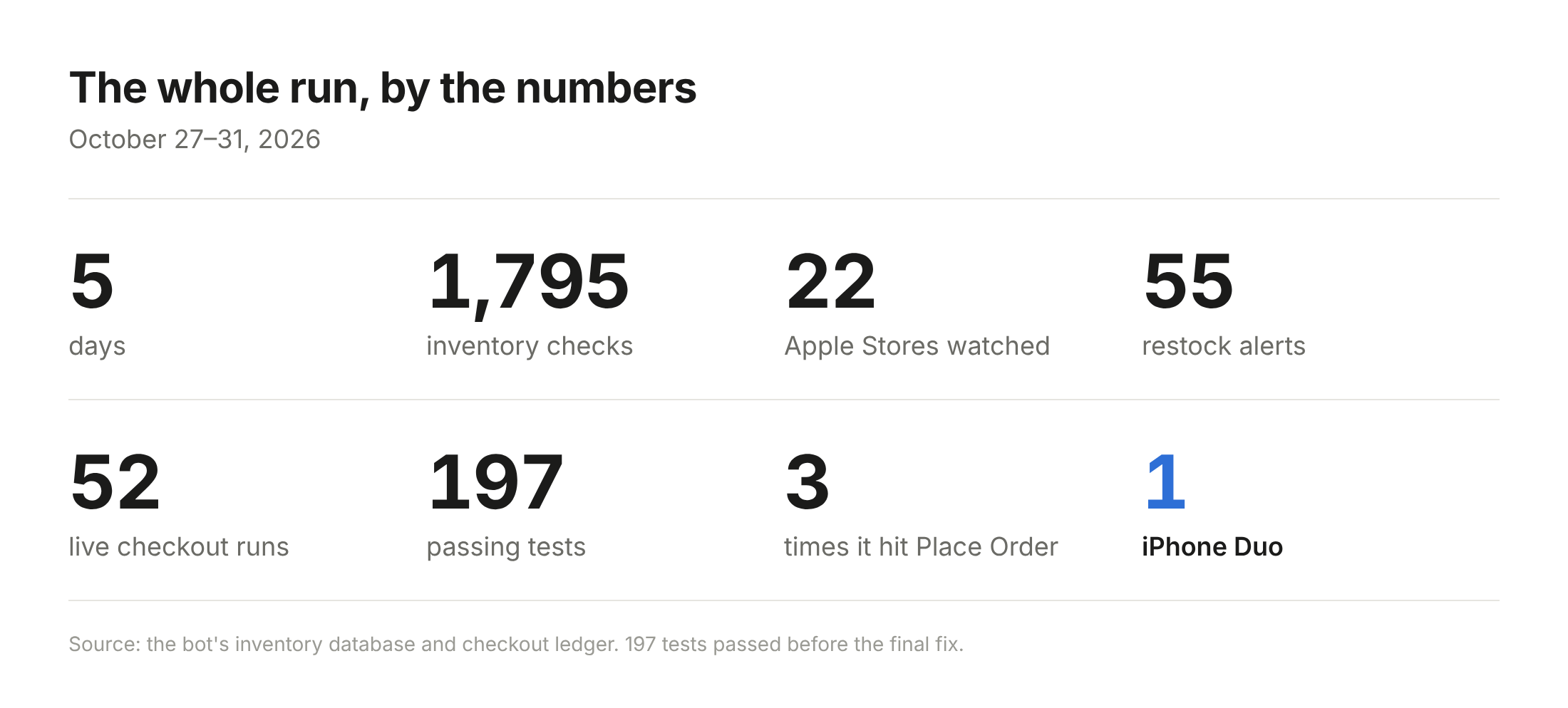
It took five days and 52 live runs. Fifty-one of them ended without a phone. This is the story of the one that worked, and why the phone turned out to be the least interesting part of the process.
Why I Desperately Needed the Duo
I’m building a few consumer apps and Duo support can’t wait until January.
Reviewers have been rough on how third-party apps look on the Duo. In Macworld’s roundup of early reviews, Tom’s Guide described unoptimized apps as ranging from slightly off to horrible. Marques Brownlee singled out apps like Discord and Google Calendar that haven’t caught up.
That’s a problem for people who bought the phone, and an opportunity for builders.
The Duo is a great piece of hardware, and the apps that show up early and feel native and optimized for the Duo will stand out. I want mine to be among them, which means testing on real hardware now, not in February.
Yes, I Know How This Sounds
When software buys up phones in seconds and resellers flip them, everyone else gets a miserable experience. Preorders were already reselling on eBay the same day they opened, for $4,000 to $10,000.
And at this point, I’d expect a better, fairer solution from Apple. Mark Gurman reported that Apple knew supply would be short and launched anyway. If you know this is going to happen (and with a launch like this, you know), you should sell it in a way that’s fair. Or open it up to the development community first, so a consumer’s experience is a good one. In order for the hardware to shine, the Duo needs to be embraced by the development community.
Step One: Just Tell Me Where the Phones Are
It turns out Apple makes it easy to check an item’s stock at any store. When you check in-store pickup on apple.com, the page calls an endpoint that returns nearby store availability as JSON:
GET https://www.apple.com/shop/retail/pickup-message
    ?pl=true
    &mts.0=regular
    &location=10001
    &parts.0=MK1H4LL%2FA
    &parts.1=MK1G4LL%2FA
location is the ZIP code to search around. Each parts.N is an Apple part number, one per configuration; those two are the 512GB Night Sky and Star White. The response lists up to 12 nearby stores. Each store comes with its ID, an availability flag for every part you asked about, and the same message you’d see on the site, like “Available Today.”
This isn’t an API, it’s the call Apple’s own product page makes, so it can change whenever Apple wants. It also tells you nothing about how many phones are on the shelf or who else is buying.
I put all eight iPhone Duo configurations into one request, so a single call returned about 96 store-and-model observations. Check that on a timer, send a push notification when a flag flips, and you have the alert that woke me up.
Naturally, Apple Will Throttle You
On day one, my script was checking every three minutes or so. Stock was gone long before I could act on it. So I checked more often, and Apple started refusing my requests.
Over five days, the bot checked Apple’s inventory 1,795 times, and 128 of those checks were refused. A healthy answer came back in well under a second. In my tests, refusals came back as HTTP 541, a non-standard status code.
The first thing I learned is that there’s no magic number. I ran two controlled tests through the proxy route I’ll get to in a moment, one at a request every 10 seconds and one at a request every 30:
pace (total)      result
1 req / 10 s      48 of 49 usable; first 541 at request 49 (~8 min)
1 req / 30 s      26 of 28 usable; first 541 at request 10 (~4.5 min)
Both got refused, and believe it or not, the slower pace got refused sooner. One run at each pace doesn’t prove much, but it was enough to kill the idea of a safe number. Anyone who tells you Apple blocks you after X requests a minute is guessing.
So I changed what I was optimizing. A fast timer that keeps getting refused is a worse monitor than a slower one that keeps getting answers.
That meant handling refusals deliberately. After a refusal, the bot waited 90 seconds, and repeated trouble stretched that to 3, 6, 12 and finally 15 minutes. Cooldowns survived restarts, so rebooting couldn’t cheat them, and twenty clean answers in a row reset the ladder.
To get more good answers, I added a second route for the inventory checks, and only the inventory checks, through a residential proxy service. Checkout and payment stayed on my own machine. The two routes ran on separate clocks, so a refusal on one didn’t blind the other.
On the busiest day, the proxy route came back with a usable answer 99.4% of the time (321 of 323), versus 96% going direct (216 of 225). It helped, and it let me check more often, because in this game a stale answer is a missed phone.
The Waits You Can’t Skip
Back to that morning.
The push notification worked. It woke me up, told me where the phone was, and I still lost. Some of that was me, half-awake. But even a perfect run hits the same wall: Apple’s checkout has waiting built in.
Pick a store, and Apple checks that location’s inventory, which can take nine or ten seconds. Enter your ZIP code, and Apple looks it up before it lets you continue. My early measurements found about four of these server waits, each nine to ten seconds, not counting a single keystroke. Even a perfect human checkout lands well past thirty seconds.
When a restock can vanish between one check and the next, a push notification plus a checkout built for humans wasn’t going to cut it. The notification script had to become a bot.
Why Not Just Pay for a Bot?
There are services for this. Some watch inventory and send alerts; some try to buy the phone for you. I’m sure some of them work. There were three things that kept me away:
Paid alerts go out to lots of subscribers, and from everything I read, they often go out in batches. Miss the first batch and you’re late before you start.
Even an instant alert still leaves you doing Apple’s checkout by hand, and you’ve seen how that went.
The services that buy on your behalf want your credit card. I wasn’t handing my card to an anonymous bot shop. The whole category felt shady.
If I wanted a bot I could trust, I’d have to build it.
So I did, first with Claude Code and then with Codex. One thing worth being clear about: the bot itself isn’t an AI. It’s ordinary browser automation, code that drives Chrome through Apple’s checkout the way I would, minus the half-asleep human. Codex helped me write it, read its logs, and iterate until I achieved my goal.
But when a phone showed up, no AI was deciding anything. The bot followed rules. That’s why it could react in milliseconds, and it’s why the real question was whether I’d written the right rules.
Trusting a Bot With My Credit Card
Even my own bot made me nervous at first. The first version filled in everything except the card number, then stopped and waited for me. What if it bought the wrong model? What if it bought five?
Apple Pay still needs you to approve each payment on your device, which put me right back in the loop. Letting Codex pull my card from 1Password meant giving an AI broad access to my password vault. No thanks. The bot never got my Apple password or a verification code either; when I tested signed-in checkout, I signed in myself.
So I asked what the worst case actually was: a wrong or extra order I’d cancel or give to someone in my family. Not a disaster. The card went into the bot’s private config file on my Mac.
But I still didn’t “trust” it. I changed the question from “do I trust this bot?” to “what has to be true before it’s allowed to buy?” The bot had to check every one of these before pressing Place Order:
Exactly one phone in the bag, in one of six approved configurations (I tracked all eight, but the 2TB models cost more than my $3,000 cap)
One of my 22 approved stores, pickup only
No AppleCare (I’ll buy it at pickup), no trade-in, no financing
Contact, billing and card details match what I configured
A total at or under $3,000
The Review page re-checked right before submitting
An order lock written first, so an uncertain result never triggers an automatic retry
No payment details in the logs, no screenshots of payment pages
None of those rules needed an AI’s judgment at checkout. They were code, checked every time.
If you’re about to let software spend your money, whether it’s an AI agent or code an AI wrote for you, write the guardrails first.
Fast Enough Beats Fastest
I didn’t need the fastest bot in the world.
The goal was never to be order number one when a store restocked. It was a successful order. First or fifteenth doesn’t matter if you walk away with the phone.
Could I have gone faster? Sure. A hundred proxy locations checking every couple of seconds would have told me about a restock within moments. That costs more, invites more blocking, and solves a problem I didn’t have.
My math was simpler: spot a restock quickly, get through checkout in about thirty seconds, and I’m done in under a minute. That won’t win every drop, and it doesn’t need to. Some restocks stick around across several minutes. Fast enough is good enough.
So thirty seconds became the target, and I started measuring where the time went. The bot was barely doing anything. In one failed run that took about 68 seconds, filling in my contact details took half a second. Roughly 61 seconds went to waiting on Apple’s servers.
Typing took milliseconds. Waiting took seconds. I’d been worrying about the wrong part.
So the work became removing waits, not speeding up clicks:
Pick the store earlier. Choosing the pickup store while the phone was still in the bag took about two seconds, versus about ten for the old store-selection step deeper in checkout.
Overlap the waits. The bot fills in the card while Apple is still looking up the ZIP code.
Skip the forms entirely. Signed-in checkout with a saved card cut a rehearsal from 49.7 seconds to 38.6 seconds to reach the final Review page, 22% faster.
Some ideas didn’t work, and they taught me just as much:
Skipping the browser and calling Apple directly got refused in 157 milliseconds. A faster refusal isn’t a faster checkout.
Fetching the next step without rendering the page still took 9.4 seconds. Rendering was never the bottleneck.
Jumping straight to the billing page just bounced me back. You can’t skip the server’s steps by changing the URL.
Pausing five seconds before a step made that step’s wait almost exactly five seconds shorter. The clock was already running. I could fill the wait, not skip it.
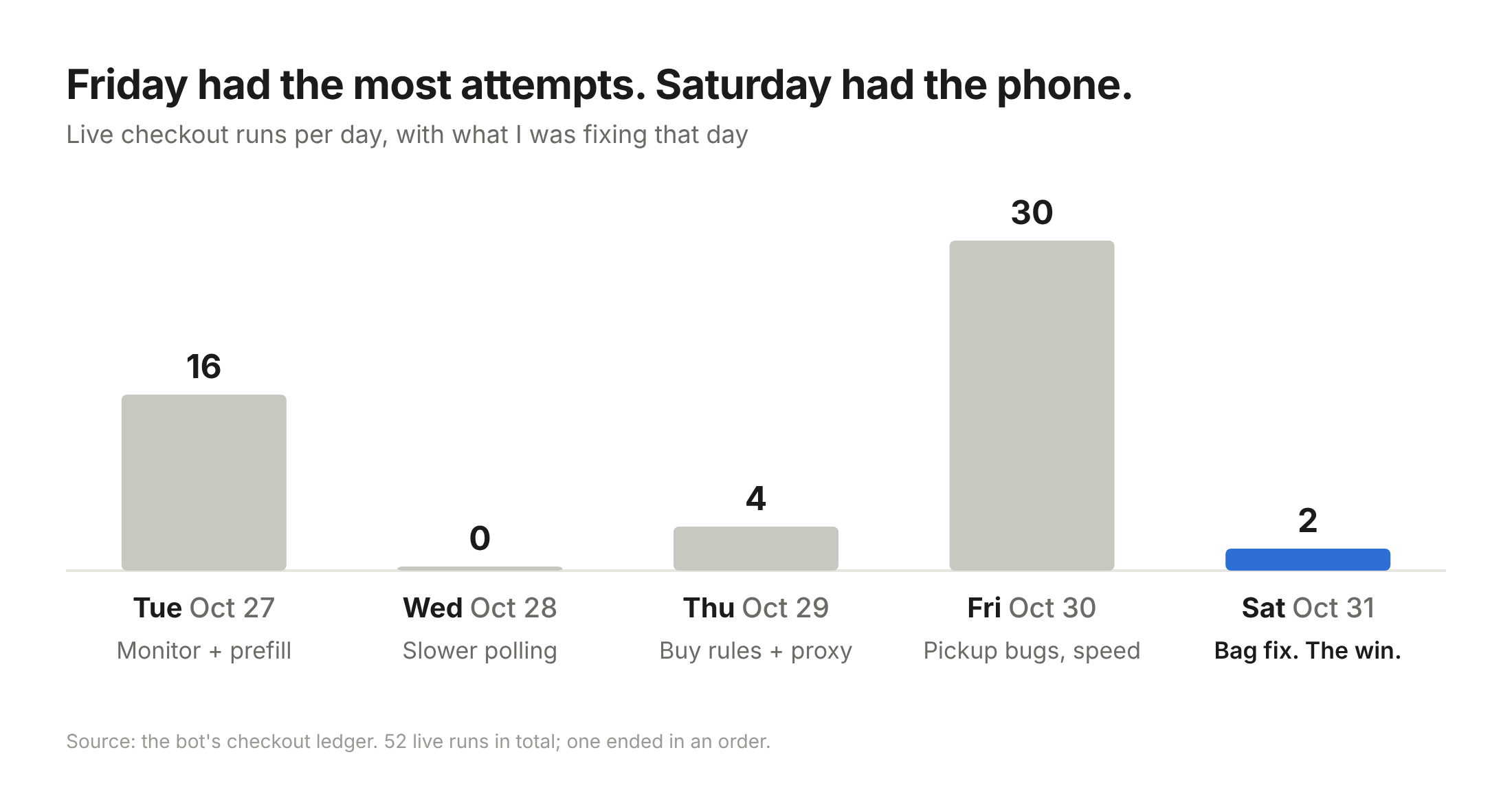
Friday: 30 Tries, Zero Phones
Friday, October 30th was the busiest day of the week. The bot saw 41 availability windows across 16 stores, most of them within a single hour.
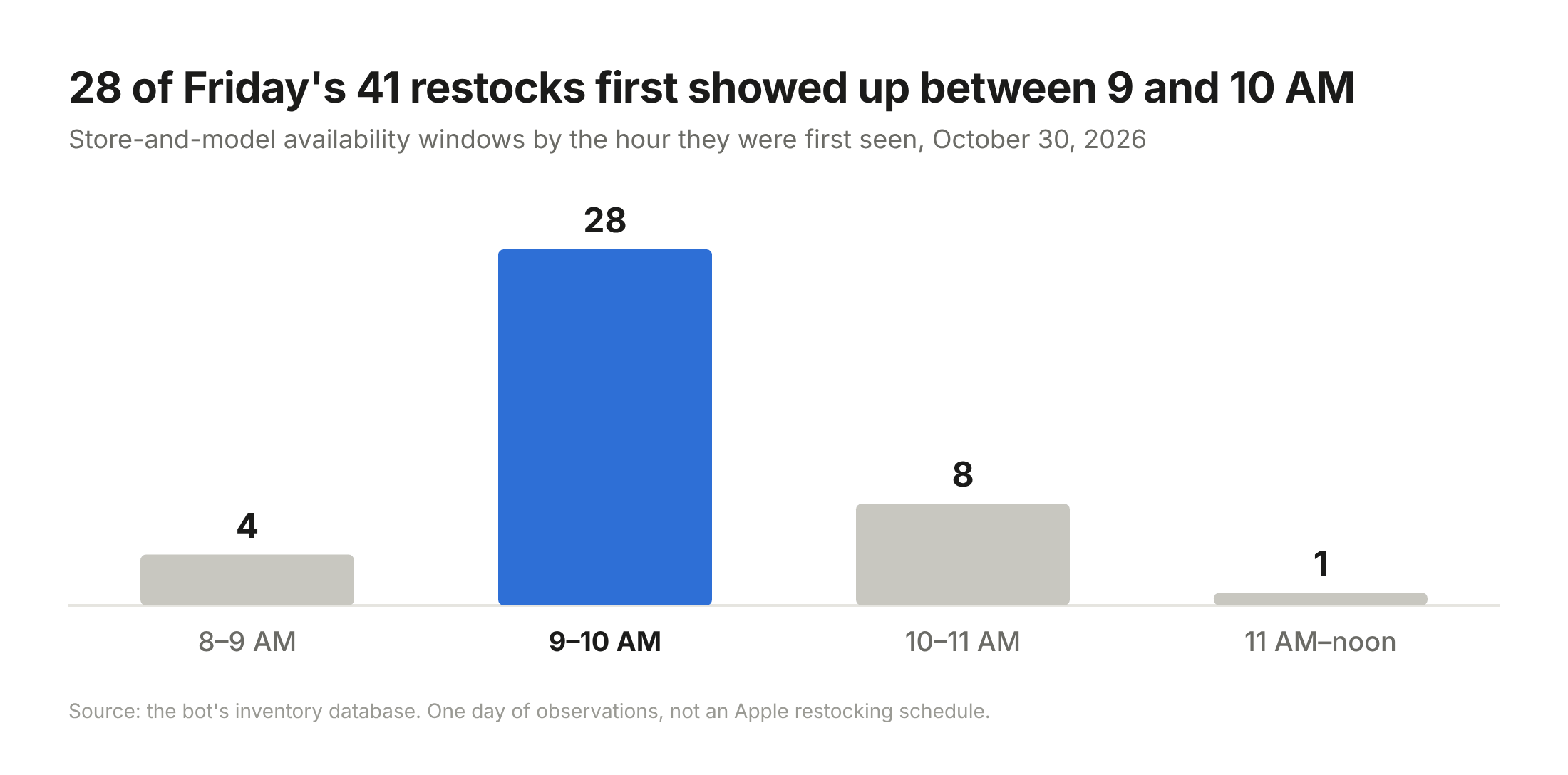
Most stock never showed up twice: 32 of the 41 appeared in just one check. By the bot’s next look at that store, typically about a minute and a half later, it was gone.
Friday also gave me more attempts than the previous three days combined. The bot ran 30 checkouts.
It went zero for thirty.
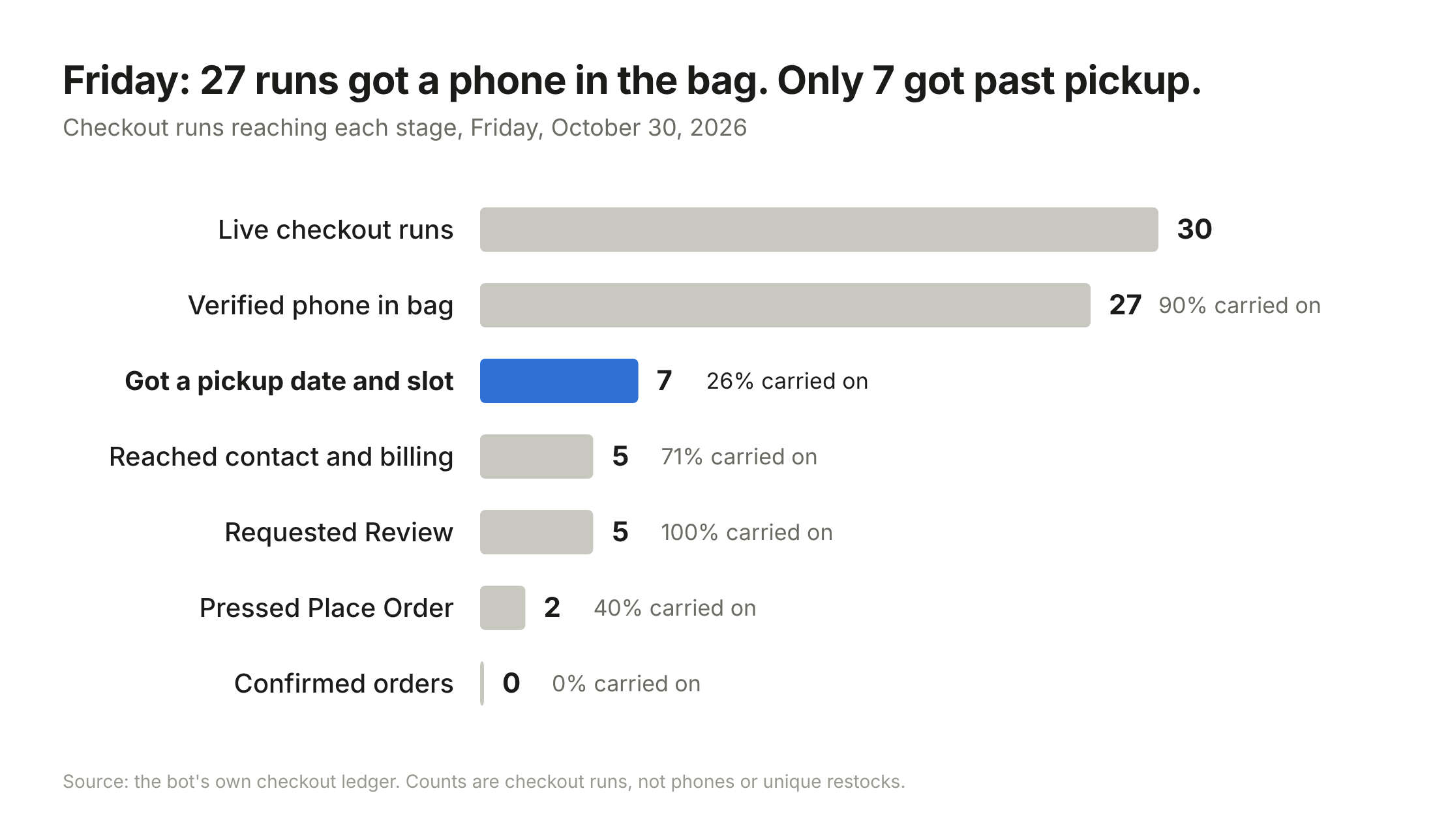
Twenty-seven runs got the right phone into the bag. Only seven got as far as choosing a pickup time. The gap between those two numbers is where the week’s two most common failures lived: checkout insisting the phone was delivery-only, and no approved store being selectable.
Twice, the bot made it all the way to Place Order and pressed it. Twice, Apple said the pickup window was no longer available. Each time, I checked my order history and my card before letting it try again.
Friday was my best day for learning and my worst day for buying.
The Failure Graveyard
Over five days, the bot made 52 live checkout runs. They ended 16 different ways. One was a success.
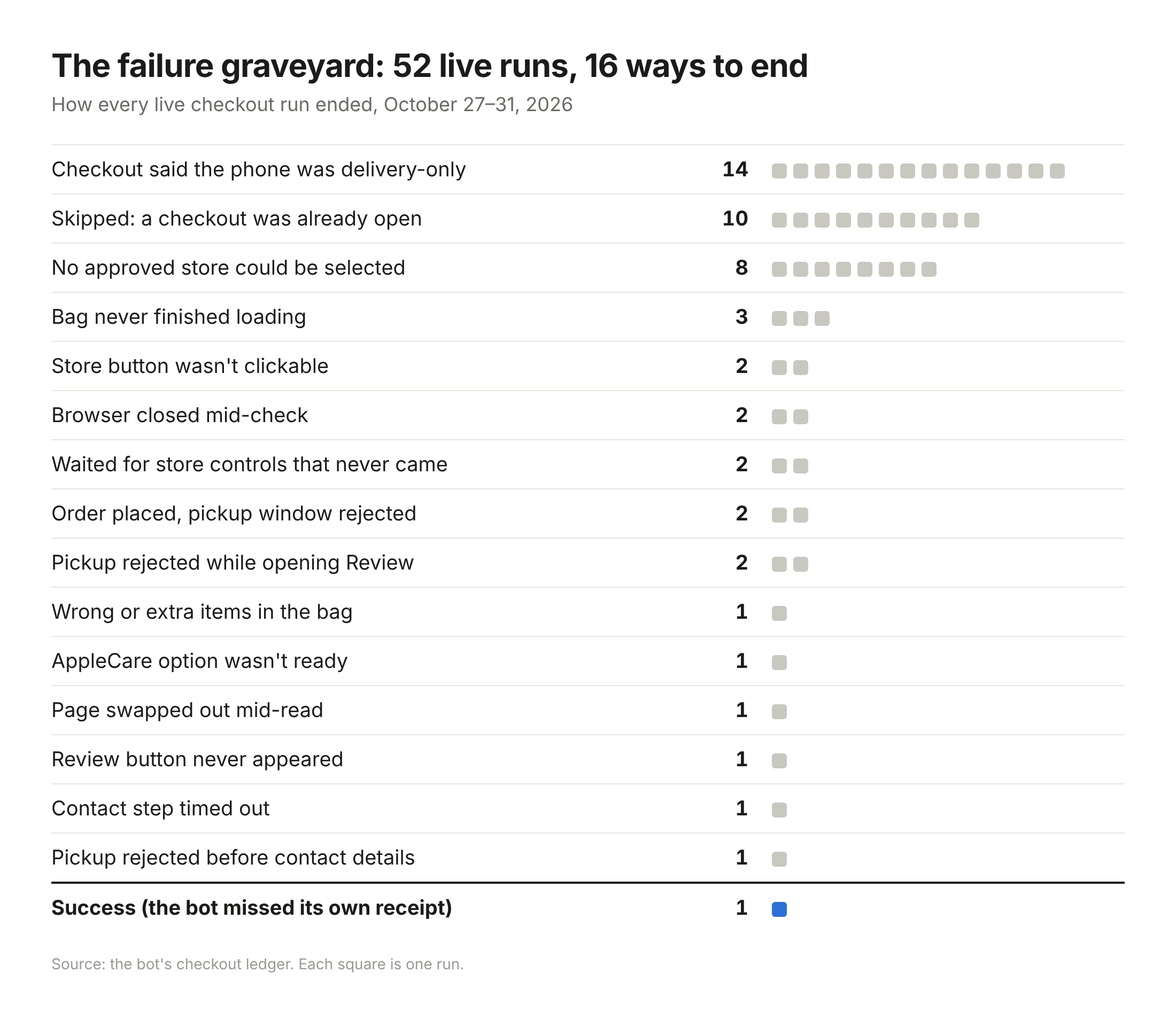
Every time I cleared one problem, the next one was already waiting.
The Win
Saturday morning I shipped one more fix. Removing an item from the bag sometimes sent the bot to Apple’s 404 page, where it would stall. Now it recovers, re-reads the bag and keeps going.
At 8:45 AM, the bot spotted a 512GB Night Sky at the Fifth Avenue store. Forty-one milliseconds later, it had started checking out. Its signed-in session had expired, so it fell back to guest checkout, worked through the funnel, reached Review, checked every rule one last time, and pressed Place Order.
Then it couldn’t tell whether it had worked.
I was watching it on the screen next to me, honestly numb. My assumption was that it would fail, and we’d be on to another iteration and another lesson.
The bot’s receipt reader didn’t recognize Apple’s confirmation, so it logged the result as unknown. It had never gotten this far before, so that code had never seen a real confirmation page. Unknown is exactly the case the order lock was for, so it didn’t try again. I found out it worked when Apple’s receipt email arrived.
iPhone Duo. 512GB. Night Sky. Pickup at Fifth Avenue.
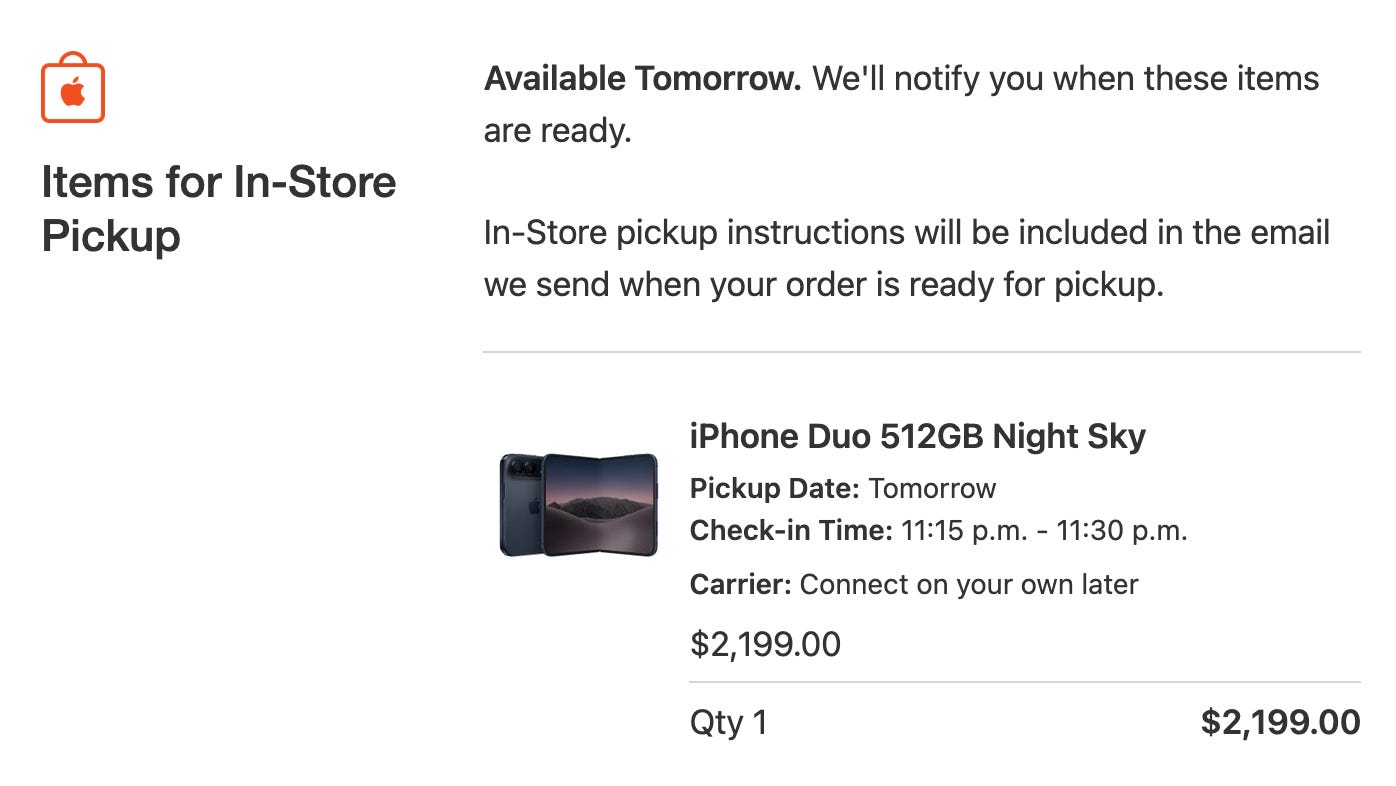
I sent one message to Codex: “WOW IT F***ING WORKED.”
Then I turned off automatic buying and paused the whole thing.
Some of that was luck. From spotting the phone to pressing Place Order, the bot took 51 seconds, nowhere near my 30-second target. It didn’t matter. That restock was still showing in Apple’s feed more than two minutes after it first appeared, longer than most. Fast enough was good enough.
But luck only pays off if you’re ready when it shows up. After five days of fixing whatever broke next, the bot was finally ready for it.
Retiring the Bot
The bot is paused. It doesn’t check inventory anymore, and it won’t wake up tomorrow morning.
There’s one footnote. My fiancée wanted a Duo too, so I ran it one more time. A few days later, it got her a 512GB Star White, and it still couldn’t read its own receipt. Then I shut it off for good.
I’m not publishing the code, on purpose. This was about getting the phone I needed for my apps (and, fine, one for my fiancée), not about building a tool for anyone else.
And Apple, if you’re listening: you capped purchases at two per customer, and I appreciate that. But a cap limits each bot. It doesn’t stop them. If one person and an AI can build this in a few days, imagine what the professionals are running.
A launch like this deserves a fairer way to sell, something like a verified queue or a draw, so the humans refreshing at their kitchen tables have a real shot.
Find the Constraint. Attack It. Repeat.
The most exciting part of this wasn’t the Duo. It was the journey building the solution.
In The Goal, Eliyahu Goldratt makes a simple argument: a system can only move as fast as its tightest constraint. Improve anything else and nothing changes. Find the constraint, fix it, then go find the new one, because there’s always a new one.
That’s what these five days were. Each fix exposed the next constraint:
Awareness. I didn’t know when stock appeared.
Freshness. My checks were too slow, or refused when they got fast.
Coverage. My searches missed five of the 22 stores.
Me. The time between an alert and my hands on a keyboard.
Browser state. Wrong items in the bag, options that weren’t ready, buttons that wouldn’t click.
Checkout state. Pickup versus delivery-only.
Latency. Apple’s own server waits.
Recovery. A bag that occasionally dumped me on a 404 page.
Knowing it worked. A bot that couldn’t read its own receipt.
The hardest constraint wasn’t technical. Real stock only showed up in a narrow window most mornings. If something broke early, I’d be fixing code while new inventory came and went without me. So I built test rigs with ordinary products and fake pages to rehearse checkout at any hour. By the end, the project had nearly 200 tests.
This is classic product management. Know the goal. Figure out why you missed it. Fix that. Ship it again tomorrow morning.
As long as you can see the goal and understand why you didn’t hit it, you can find the constraint and attack it.
This Project Would Have Expired
Here’s a slightly embarassing truth:
Without AI, I think this would have taken me weeks to get right. By then the phone would have arrived in January, or been sitting on shelves, and I’d have killed the project half-built. The bot would have been worthless before it was finished.
With AI, it took five days, and the limit was how often I could test, not how fast I could build. Each day gave me three or four rounds of fix-and-retry.
AI didn’t make this easy. It didn’t write a perfect bot in one shot. It took 52 live runs, and all but one of them ended without a phone. What AI did was make each round fast.
Take Nanuet. We read the trace and saw a pickup button that looked selected and a server that had never confirmed it. We changed the bot to wait for Apple’s answer instead of trusting the button, then rebuilt the bug on a fake page to prove the fix without waiting for real stock. That’s one round: trace, diagnosis, fix, test.
AI made the loop fast enough to fit inside the window where this project still mattered.
That’s the real shift. It’s not just that coding is faster. Projects have expiration dates, and AI is pulling a lot of them back inside the window where they’re worth doing.
Not every project has a deadline, though. Some just cost more than they’re worth. I have one of those sitting on my desk right now.
I bought a Razer 4K webcam that I love. Beautiful image. But I couldn’t find software that worked for my setup. Razer’s own Synapse didn’t help, and the open-source projects I found looked abandoned. I want to turn off the autofocus, and I want real control over color: saturation and contrast.
It was never worth weeks of my time, so the old me would have shrugged and lived with it. Now I’m thinking: that’s a Saturday. Maybe I put it on GitHub so other people can use it too.
Back in February I wrote about The Great Filter for Ideas: how AI removed almost every barrier to creation, and yet so few people ship. I still believe that. But this project made me wonder whether part of the filter is simpler than drive. Maybe it’s a reflex. Remembering that you can just do things.
Oh, I can just do that.
Most of us haven’t built that reflex yet.
So what’s the thing you’ve been meaning to build? The one with an expiration date?
Build it before it expires.
—
Thanks for reading Zero to Pete.